StressFree | David Harrison

Open source development & digital architectural collaboration

USB devices with VMWare Server 2.0 on Ubuntu

Submitted by David on 17 August 2009 - 5:17pm

One of the nice features of VMWare Server 2.0 is that it supports the forwarding of USB devices to virtual machines. Unfortunately when it comes to Linux the VMWare team have leveraged an old method (/proc/bus/usb) for scanning the USB bus which newer distributions, such as Ubuntu Server 8.04 no longer support.

To resolve this problem the "old" method for scanning for USB devices must be enabled in the underlying operating system. In the case of Ubuntu Server 8.04 this is a case of editing the file /etc/init.d/mountdevsubfs.sh and uncommenting the following section:

#
# Magic to make /proc/bus/usb work
#
mkdir -p /dev/bus/usb/.usbfs
domount usbfs "" /dev/bus/usb/.usbfs -obusmode=0700,devmode=0600,listmode=0644
ln -s .usbfs/devices /dev/bus/usb/devices
mount --rbind /dev/bus/usb /proc/bus/usb

Reboot the server and /proc/bus/usb should be functional once more.

Activating a USB device within a virtual machine

Once the underlying USB subsystem is configured the USB device needs to be associated with a virtual machine. For this to occur the virtual machine must have the USB Controller added to its virtual hardware configuration. If the controller is not already part of the virtual machine's configuration shutdown the VM, add the device and restart.

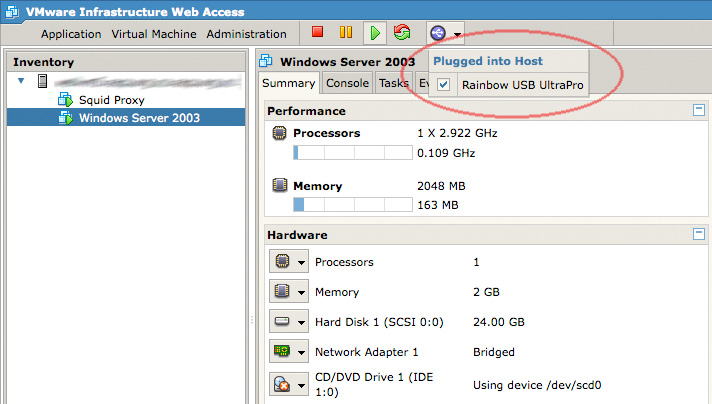
Assuming there are USB devices attached to the server, once the virtual machine boots a small USB icon will appear within the VMWare web management console. Click on the icon and select the relevant USB device to attach it to the running virtual machine.

All going well the USB device will appear within the virtual machine as an accessible device. VMWare Server remembers this selection, so the next time the virtual machine (or server itself) is restarted the USB device will automatically be attached to the running VM.

Suggestions For Improving Your Research Process

Submitted by David on 22 July 2009 - 5:43pm

Below is a presentation I gave today to a group of Honors students at Victoria University's School of Architecture and Design. The presentation covers what I have learnt during my time doing my PhD and the mistakes I made, especially around the research process.

The primary message of the presentation is that research is by no means easy and when things get difficult you need to focus on MUPPET:

Motivate - Eureka moments only take you so far.

Undertake - Write something every (other) day.

Plan - Conciously identify your rainbow (objective), horse (process) and cart (interest).

Ponder - Understand how your actions relate to the research.

Exchange - Talk to everyone (relevant) about your research.

Test - Continually evaluate what you have done and where you are going.


VMWare Server 2.0 optimisations

Submitted by David on 19 July 2009 - 8:42pm

VMWare Server 2.0 is emerging as a capable, zero cost alternative to VMWare ESX when used in combination with Ubuntu Server 8.04LTS. Unfortunately "out of the box" performance can be a little disappointing, especially when running guest Windows virtual machines. What follows are a few system tweaks that can improve performance without hampering overall system stability. I have not come up with these myself, instead they are pruned from the following pages:

Kernel parameters

In addition to the default Ubuntu Server kernel parameters, the following should be appended to the end of /etc/sysctl.conf.

vm.swappiness=0
vm.overcommit_memory=1
vm.dirty_background_ratio=5
vm.dirty_ratio=10
vm.dirty_expire_centisecs=1000
dev.rtc.max-user-freq=1024

Once added reboot the server to ensure their application is successful and permanent.

Create an in-memory temp drive

In the host's /tmp directory create a new directory named vmware (e.g. /tmp/vmware). This will be used as the mount point for a tmpfs (in-memory) partition for storing VM related, temporary files.

Edit /etc/fstab and add the /tmp/vmware partition to your list of mount points:

tmpfs /tmp/vmware tmpfs defaults,size=100% 0 0

Now if you execute the following command the tmpfs filesystem will be mounted at /tmp/vmware:

sudo mount /tmp/vmware

If successful, reboot the Ubuntu server to ensure the tmpfs partition is mounted at boot time.

VMWare Server configuration

Edit the /etc/vmware/config file and ensure the following configuration declarations are set:

prefvmx.minVmMemPct = "100"
prefvmx.useRecommendedLockedMemSize = "TRUE"
mainMem.partialLazySave = "TRUE"
mainMem.partialLazyRestore = "TRUE"
tmpDirectory = "/tmp/vmware"
mainMem.useNamedFile = "FALSE"
sched.mem.pshare.enable = "FALSE"
MemTrimRate = "0"
MemAllowAutoScaleDown = "FALSE"

These configuration declarations instruct VMWare Server to keep all virtual machines in memory and not to write unused blocks to disk. It also sets the temporary directory to the newly created tmpfs partition at /tmp/vmware.
Restart the VMWare Server process (sudo /etc/init.d/vmware restart) or reboot the server for these changes to take effect. The net result should be notably smoother virtual machine performance, especially when it comes to Windows guests.

Virtual machine tips

  • Always use fully allocated disk images.
  • Do not use snapshots as they are approximately 20% slower.
  • Always install the VMWare Tools package.
  • If running Linux make sure the kernel is compiled for running within a VM, or is using the correct boot time parameters.


Be2camp presentation on architectural micro-blogging

Submitted by David on 15 May 2009 - 10:34pm

Below is the slide presentation I will (hopefully) present at tonight's Be2camp North un-conference. Basically the presentation graphically summarises my recent blog post on the use of micro-blogging within architectural collaboration.

The conference is in Liverpool and I am in New Zealand, so if the technology gods are not in a good mood things may go pear shaped very quickly...


Using micro-blogging to record architectural design conversation alongside the BIM

Submitted by David on 11 May 2009 - 10:16pm

The majority of professionals within the architecture, engineering and construction (AEC) industry use the telephone and email to collaborate on immediate design problems. Unfortunately there is a disconnection between this communication and the underlying Building Information Model (BIM) where the agreed upon architectural solution is recorded. As a consequence it is difficult for a person interacting solely with the BIM to take part or learn from this external conversation because they are often oblivious to it taking place. Micro-blogging is an emerging, Internet-based communication medium that may provide the common thread to tie these disparate sources of project information together. It will achieve this through enabling the issues and outcomes discussed during architectural conversations to be quickly recorded by any member of the project team. Those working on the BIM will be able to actively monitor and search across these conversations to keep up to date with the project’s state and help solve new design problems.

Unlike blogging and instant messaging, micro-blogging can communicate simple messages between groups of people using mobile phones or any Internet connected device. These conversations are published online so they can be referenced in further design discussion, or indexed for searching alongside other sources of project information. For adoption to occur the technology must be integrated within the BIM toolset so that being part of this conversation is a natural extension of the digital workspace. Current micro-blogging services such as Twitter, lack this integration and have not (yet) been tailored to meet the specific demands of architectural collaboration. A focused implementation would likely improve architectural collaboration because micro-blogging embodies many of the principles of the Project Information Cloud. Its qualities of simplicity, ubiquity, decentralisation, modularity, awareness, context sensitivity and evolving semantics make it a promising collaboration medium, and one that could move the AEC industry towards the goal of hyperlinked practice.

Google O3D may finally bring 3D to the Web

Submitted by David on 22 April 2009 - 11:23pm

Today Google released a very early preview of O3D, a cross-platform, open source plug-in that enables OpenGL accelerated graphics within Web browsers. Delivering 3D graphics within browsers is not a new thing, (remember VRML?) but what makes this initiative promising is that it works on all platforms and is backed by Google. Performance-wise O3D seems very snappy when compared to alternatives such as Flash 3D. As a result some of the initial demonstrations are very impressive, and it hints at a future where Google Earth and SketchUp leave their desktop roots behind to become pure web applications.

Fixing yum's "Metadata file does not match checksum" error

Submitted by David on 13 April 2009 - 10:21pm

Centos is a "free" distribution of Red Hat Enterprise Linux which I enjoy using. Whilst it does not have Debian's apt-get for package management it does have yum, which is not as fast but still works pretty well in most circumstances. Unfortunately today I ran into a problem in a clean install of Centos 5.3 where yum was returning the following error:

Error Message: Metadata file does not match checksum

A quick look around "the Google" turned up the relatively simple solution; at the terminal execute as root:

yum clean all
yum makecache
yum update

This process will take a little time, but the end result should be a nice, clean yum repository cache, complete with no annoying meta-data errors.


Autodesk Dragonfly emerges from its larvae

Submitted by David on 13 March 2009 - 3:20pm

Project Dragonfly is an Autodesk Labs technology preview of a web-based, simple to use architectural planning tool. It represents a step towards a future where CAD and BIM model editors are not considered bloated, complex, or desktop-bound. Whilst the current functionality of the tool is limited, it is technically impressive, and the underlying concept hints that Autodesk’s broader web strategy (as discussed in ‘Autodesk Beyond Desktop CAD & BIM’) is proceeding at a slow, but steady pace.

Fixing a stalled OSX software update

Tags:
Submitted by David on 11 March 2009 - 10:47am

When I recently run Software Update on my MacBook Air I found it would stall at about the 10% mark during the "Checking for new software" phase. Below is a screenshot of what I mean by this:

A check of Activity Monitor showed that the problem was not caused by any network issue, in fact Software Update was not even trying to connect to the Internet. Fortunately this Apple support discussion page lead to the answer.

The problem appears to be caused by a corrupted, user-level software update cache file. To resolve delete the Cache.db file from your Library/Caches/com.apple.SoftwareUpdate directory. Once trashed repeat the software update process and all should be back to normal.

The discussion thread also discussed an interesting command line tool for performing OSX software updates. To perform a software update from the command line execute the following command (your password is required for sudo privileges):

sudo softwareupdate -i -a

This will run a fully automatic software update process, and once complete prompt you to restart the computer if required. Whilst a niche tool, it is a handy command to know about when performing remote OSX administration:


BIMserver and the potential of server-side BIM

Submitted by David on 26 February 2009 - 10:20pm

We are now at a stage where a computer's speed and network connection are no longer significant process bottlenecks in digital architectural design. As a consequence the need for efficient digital collaboration tools within the architecture, engineering and construction (AEC) industry is a growing requirement. The BIMserver project from TNO and the University of Eindhoven is exploring how collaborative design can be improved through the combination of Building Information Model (BIM) and open source server technologies. Unlike conventional, workstation-based CAD software, BIMserver stores BIM data within a dedicated server where it can be accessed by all members of the design team simultaneously. Whilst conceptually not a new idea, the project is the first to move beyond the research lab and be promoted as software (almost) ready for production deployment within AEC organisations.

What is a BIM server?

BIM in its most general sense is a collection of 2D, 3D and textual data that when assembled within a computer’s memory creates an accurate and detailed representation of an architectural project. Like its predecessor CAD, BIM data is typically stored in a digital file (or files) where it is accessed directly by complex, workstation-based applications such as Revit and Microstation. In contrast a BIM server stores all design data internally and exposes its information to client applications through a series of well controlled and documented interfaces. This has a number of practical and technical advantages, the most significant being all client applications read from, and write to, the same digital model. In comparison when using a file-based BIM it is up to each participant to ensure they are working on the latest revision of the project’s files. Additionally by centralising the flow of data a BIM server enables near real-time collaboration as changes to the model are reflected on all clients each time their view of the data is refreshed from the server.

Another important characteristic of a BIM server is that the building model exists as a live entity, distinct from the client applications that interact with it. This means client applications are simpler to write because they do not need to know how to comprehend an entire digital model, they simply need to ask the BIM server for the subset of information that concerns them. For example using a traditional file-based BIM an application that counts the number of doors in a design needs to parse the file, construct an in-memory model, and then count the door instances. In comparison a BIM server handles the parsing of the digital model, all the client application needs to do is construct a query that asks how many doors the design has. Another benefit of a live BIM is that the server can automatically respond to outside events such as scheduled processes or changes to data hosted by external services. For example the BIM server could monitor the pricing and availability of materials used in the design and automatically update the model to reflect these variations. The end result is that instead of being viewed as a static, “dumb” file, the migration of the Building Information Model into a server would create a far more dynamic and accessible project resource. Read more »